포커스 체인
Careti 포커스 체인은 장기 작업을 위한 자동 TODO 관리 기능입니다. LLM에 전달되는 컨텍스트를 지속적으로 관리하며, 여러 번의 컨텍스트 리셋에서도 진행 상황을 유지합니다.
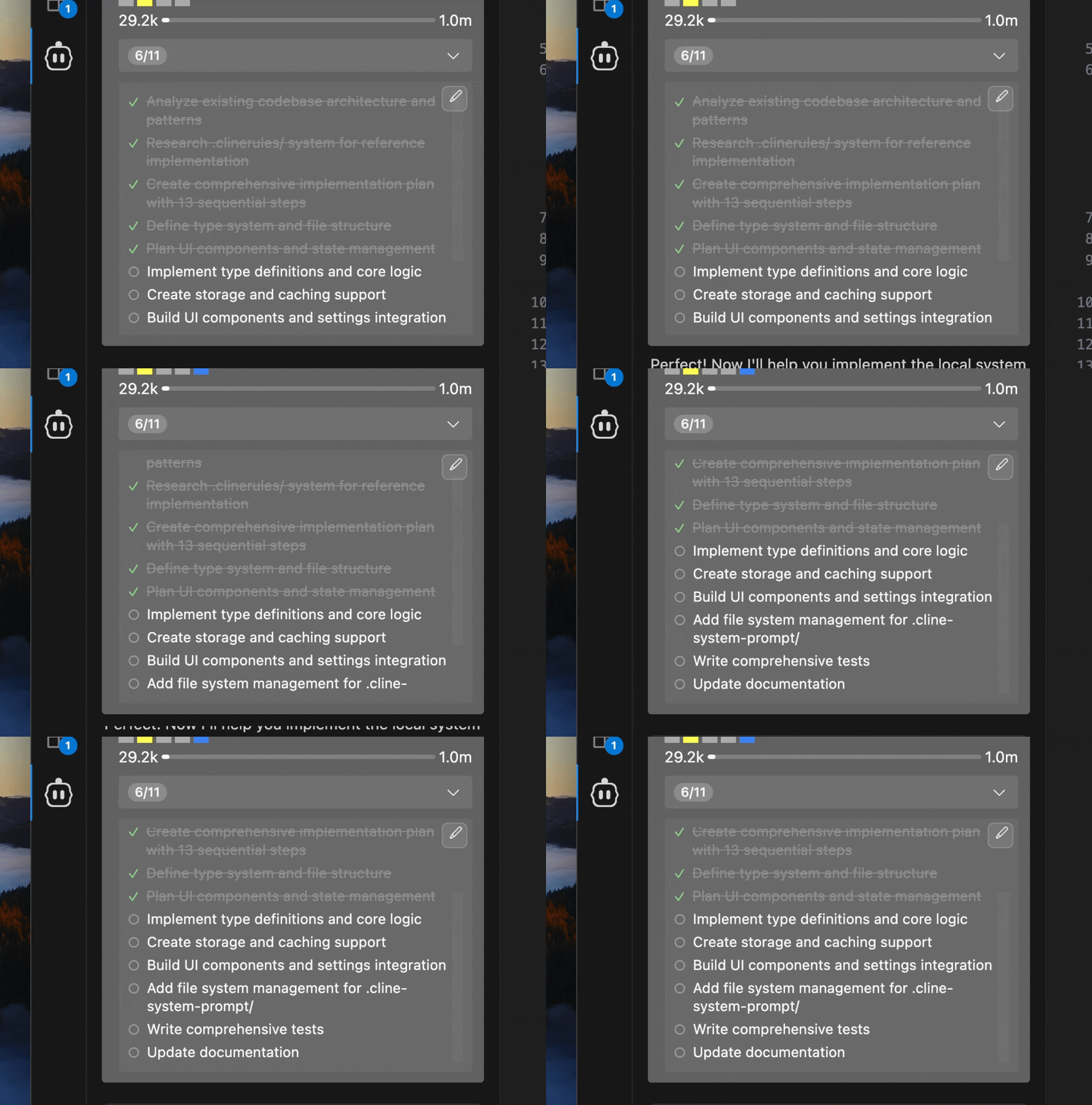
딥 플래닝 슬래시 명령과 함께 사용하면, 계획 단계에서 만든 구현 TODO를 실시간으로 추적할 수 있습니다.
주요 기능
자동 TODO 생성
- 작업을 분석해 체크리스트 형태의 TODO를 자동 생성
- 복잡한 작업을 단계별로 쪼개어 관리
- 진행 상황에 따라 실시간 업데이트
직접 편집 가능한 TODO
- TODO는 마크다운 파일로 저장되어 바로 수정 가능
- 수정 사항을 자동으로 감지해 워크플로에 반영
- 작업 헤더의 편집 버튼으로 빠르게 접근
시각적 진행 표시
- 작업 헤더에 현재 진행도(예: 3/8)를 표시
- 완료 항목 체크, 진행 중 항목 강조
- 확장 뷰로 전체 목록 확인
리마인더
- 기본 6메시지 간격(1~100까지 설정 가능)으로 TODO 갱신 알림
- Plan → Act 전환 시 자동 알림
- 수동 편집 시 즉시 업데이트
시작하기
- Careti 설정(⚙️) → Features에서 Enable Focus Chain 활성화
- Remind Careti Interval 값 조정(기본 6)
- 새 작업 시작 → TODO 자동 생성/관리 시작
| 설정 | 기본값 | 범위 | 설명 |
|---|---|---|---|
| Enable Focus Chain | Disabled | On/Off | 향상된 진행 추적 활성화 |
| Remind Careti Interval | 6 | 1-100 messages | TODO 갱신 알림 주기 |
4. User Editing
Need to tweak the todo list? No problem.
Editing Process:
-
Open Editor: Click the edit button in the expanded todo view
-
Edit File: A markdown file opens in your editor:
# Focus Chain Todo List for Task abc123

<!-- Edit this markdown file to update your focus chain todo list -->
<!-- Use - [ ] for incomplete items and - [x] for completed items -->

- [x] Set up project structure
- [x] Install authentication dependencies (e.g., Firebase Auth)
- [x] Create user registration component
- [ ] Implement login functionality
- [ ] Add password reset feature
- [ ] Set up protected routes
- [ ] Implement logout functionality
- [ ] Add user profile page
- [ ] Write authentication tests
- [ ] Deploy to staging environment

<!-- Save this file to update the task's todo list --> -
Customize: Add, remove, or reorder items as needed
-
Save: Careti automatically detects and uses your updates
File Structure
Todo List Storage
Todo lists are stored as markdown files in your task directory:
<VSCode Global Storage>/
  tasks/
    <taskId>/
      focus_chain_taskid_<taskId>.md
      ... other task files
Markdown Format
Todo files use standard markdown checklist syntax:
# Focus Chain Todo List for Task abc123

<!-- Edit this markdown file to update your focus chain todo list -->
<!-- Use the format: - [ ] for incomplete items and - [x] for completed items -->

- [x] Set up project structure
- [x] Install authentication dependencies
- [ ] Create user registration component
- [ ] Implement login functionality
- [ ] Add password validation
- [ ] Set up user database schema
- [ ] Write authentication tests
- [ ] Deploy to staging environment

<!-- Save this file and the todo list will be updated in the task -->
Integration with Plan/Act Mode
Focus Chain works seamlessly with Careti's Plan/Act mode:
- Plan Mode: Optional todo lists for presenting concrete steps
- Act Mode: Automatic todo creation when switching from Plan Mode
For complex projects, start in Plan Mode to discuss and refine your approach before switching to Act Mode for implementation.
Best Practices
- Start with Clear Requests
- Provide detailed initial task descriptions
- Include specific requirements and constraints
- Mention any preferred technologies or approaches
- Review Generated Lists
- Check that Careti's breakdown aligns with your expectations
- Verify that all important steps are included
- Ensure the order makes sense for your project
- Edit When Needed
- Add missing steps you identify
- Remove unnecessary items
- Reorder steps for better workflow
- Add more specific details to general items
- Use Plan Mode First
- Discuss the approach before implementation
- Refine requirements through conversation
- Switch to Act Mode when ready to begin work
- Break Down Large Tasks
- Split complex projects into smaller, manageable tasks
- Create separate todo lists for different components
- Focus on one major area at a time
- Regular Reviews
- Check progress periodically during long tasks
- Update todo lists as requirements evolve
- Communicate changes to Careti through edits
- Share Todo Files
- Todo markdown files can be shared with team members
- Include in version control for project documentation
- Use as basis for project planning discussions
- Consistent Format
- Follow the standard markdown checklist format
- Keep item descriptions clear and actionable
- Use consistent terminology across todo lists
:::
Troubleshooting
Having issues? Try these quick fixes:
- Check that Focus Chain is enabled in settings
- Focus Chain may not work as well with smaller, less capable models
- Ensure file permissions are correct in the task directory
- Verify your editor supports markdown
- Check VSCode has write permissions for the directory
- Ensure todo items use correct syntax (
- [ ]and- [x]) - Verify the markdown file is properly formatted
:::
Still stuck? Use the /reportbug command in Careti to get help.
Technical Details (for the curious)
- Real-time file watching detects changes to todo markdown files
- Automatic synchronization between file edits and UI updates
- Graceful handling of file creation, modification, and deletion
- Dynamic counting of completed vs. total todo items
- Support for both
- [x]and- [X]completion syntax - Unicode symbols (✓, ○) for enhanced visual display
- Todo lists stored locally in VSCode workspace
- No todo content transmitted to external services
- Usage telemetry (can be disabled in settings)
:::
Focus Chain turns Careti into your personal project manager, keeping you on track and your tasks organized. Give it a try on your next project!