フォーカスチェーン
フォーカスチェーンは長期タスク向けの自動TODO管理機能です。LLMに渡すコンテキストを途切れず管理し、複数回のコンテキストリセットでも進行状況を維持します。
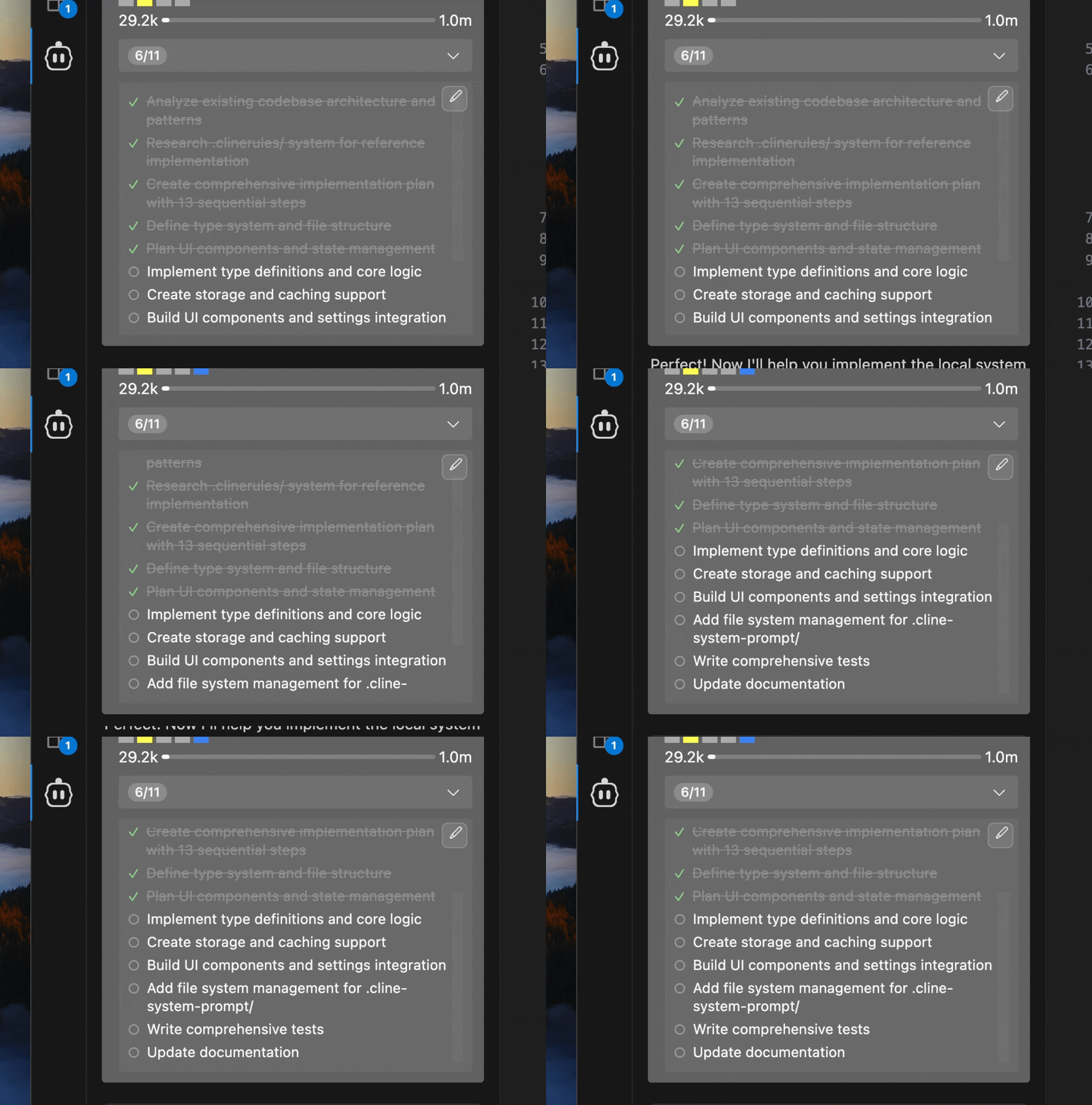
ディーププランニングスラッシュコマンドと組み合わせると、計画で作ったTODOを実装中もシームレスに追跡できます。
主な機能
自動TODO生成
- タスクを分析し、チェックリスト形式のTODOを自動生成
- 複雑な作業をステップに分割
- 進行に応じてリアルタイム更新
編集可能なTODO
- マークダウンファイルで保存・直接編集可能
- 変更を自動検知してワークフローに反映
- タスクヘッダーの編集ボタンから即アクセス
進捗の可視化
- ヘッダーに現在の進捗(例: 3/8)を表示
- 完了項目のチェック、進行中の強調
- 展開ビューで全TODOを確認
リマインダー
- 6メッセージごと(1〜100設定可)に更新リマインド
- Plan→Act 切り替え時に自動通知
- 手動編集時も即時更新
はじめ方
- Careti設定(⚙️) → Featuresで Enable Focus Chain をオン
- Remind Careti Interval を調整(デフォルト6)
- 新しいタスクを開始すると自動でTODO生成・管理開始
| 設定 | デフォルト | 範囲 | 説明 |
|---|---|---|---|
| Enable Focus Chain | Disabled | On/Off | 進捗トラッキングを有効化 |
| Remind Careti Interval | 6 | 1-100 messages | TODO更新リマインド間隔 |
4. User Editing
Need to tweak the todo list? No problem.
Editing Process:
-
Open Editor: Click the edit button in the expanded todo view
-
Edit File: A markdown file opens in your editor:
# Focus Chain Todo List for Task abc123

<!-- Edit this markdown file to update your focus chain todo list -->
<!-- Use - [ ] for incomplete items and - [x] for completed items -->

- [x] Set up project structure
- [x] Install authentication dependencies (e.g., Firebase Auth)
- [x] Create user registration component
- [ ] Implement login functionality
- [ ] Add password reset feature
- [ ] Set up protected routes
- [ ] Implement logout functionality
- [ ] Add user profile page
- [ ] Write authentication tests
- [ ] Deploy to staging environment

<!-- Save this file to update the task's todo list --> -
Customize: Add, remove, or reorder items as needed
-
Save: Careti automatically detects and uses your updates
File Structure
Todo List Storage
Todo lists are stored as markdown files in your task directory:
<VSCode Global Storage>/
  tasks/
    <taskId>/
      focus_chain_taskid_<taskId>.md
      ... other task files
Markdown Format
Todo files use standard markdown checklist syntax:
# Focus Chain Todo List for Task abc123

<!-- Edit this markdown file to update your focus chain todo list -->
<!-- Use the format: - [ ] for incomplete items and - [x] for completed items -->

- [x] Set up project structure
- [x] Install authentication dependencies
- [ ] Create user registration component
- [ ] Implement login functionality
- [ ] Add password validation
- [ ] Set up user database schema
- [ ] Write authentication tests
- [ ] Deploy to staging environment

<!-- Save this file and the todo list will be updated in the task -->
Integration with Plan/Act Mode
Focus Chain works seamlessly with Careti's Plan/Act mode:
- Plan Mode: Optional todo lists for presenting concrete steps
- Act Mode: Automatic todo creation when switching from Plan Mode
For complex projects, start in Plan Mode to discuss and refine your approach before switching to Act Mode for implementation.
Best Practices
- Start with Clear Requests
- Provide detailed initial task descriptions
- Include specific requirements and constraints
- Mention any preferred technologies or approaches
- Review Generated Lists
- Check that Careti's breakdown aligns with your expectations
- Verify that all important steps are included
- Ensure the order makes sense for your project
- Edit When Needed
- Add missing steps you identify
- Remove unnecessary items
- Reorder steps for better workflow
- Add more specific details to general items
- Use Plan Mode First
- Discuss the approach before implementation
- Refine requirements through conversation
- Switch to Act Mode when ready to begin work
- Break Down Large Tasks
- Split complex projects into smaller, manageable tasks
- Create separate todo lists for different components
- Focus on one major area at a time
- Regular Reviews
- Check progress periodically during long tasks
- Update todo lists as requirements evolve
- Communicate changes to Careti through edits
- Share Todo Files
- Todo markdown files can be shared with team members
- Include in version control for project documentation
- Use as basis for project planning discussions
- Consistent Format
- Follow the standard markdown checklist format
- Keep item descriptions clear and actionable
- Use consistent terminology across todo lists
:::
Troubleshooting
Having issues? Try these quick fixes:
- Check that Focus Chain is enabled in settings
- Focus Chain may not work as well with smaller, less capable models
- Ensure file permissions are correct in the task directory
- Verify your editor supports markdown
- Check VSCode has write permissions for the directory
- Ensure todo items use correct syntax (
- [ ]and- [x]) - Verify the markdown file is properly formatted
:::
Still stuck? Use the /reportbug command in Careti to get help.
Technical Details (for the curious)
- Real-time file watching detects changes to todo markdown files
- Automatic synchronization between file edits and UI updates
- Graceful handling of file creation, modification, and deletion
- Dynamic counting of completed vs. total todo items
- Support for both
- [x]and- [X]completion syntax - Unicode symbols (✓, ○) for enhanced visual display
- Todo lists stored locally in VSCode workspace
- No todo content transmitted to external services
- Usage telemetry (can be disabled in settings)
:::
Focus Chain turns Careti into your personal project manager, keeping you on track and your tasks organized. Give it a try on your next project!